| Hey, | Welcome to AlphaSignal – the most read newsletter by AI developers.
We bring you the top 1% of news, papers, models, and repos, all summarized to keep you updated on the latest in AI. |
|
|
|
IN TODAY'S SIGNAL
| Read time: 5 min 27 sec | 🎖️ Top News
📌 Encord
⚡️ Trending Signals
📌 Fiddler AI
🛠️ Top Tutorials
📕 How To |
|
|
|
If you're enjoying AlphaSignal please forward this email to a colleague.
It helps us keep this content free. |
|
|
|
TOP NEWS
| Document Processing | Anthropic introduces PDF analysis in Claude 3.5 Sonnet for direct API use |
⇧ 4,365 Likes |
 |
What's New |
Claude 3.5 Sonnet, developed by Anthropic, now includes the ability to analyze PDF files, a feature currently in public beta. This enhancement allows the model to interpret both text and visual elements such as images, charts, and tables within PDFs.
Key Specifications
- Maximum request size: 32MB
- Maximum pages per PDF: 100
- Token usage per page: 1,500 to 3,000 tokens
- Supported platforms: Claude 3.5 Sonnet API, with upcoming support on Amazon Bedrock and Google Vertex AI
- Requirements: PDFs must be unencrypted and password-free
The PDF processing workflow involves several steps. First, the system extracts the contents of the document and converts each page into an image while simultaneously extracting the text. Claude then analyzes the combined text and image data, enabling users to request specific insights on visual components like diagrams and tables.
Technical Details Integration Capabilities: Works with prompt caching, batch processing, and tool functions for scalable document analysis and efficient data extraction.
This integration facilitates scalable and repeated analysis, as well as targeted extraction of specific information from documents.
Token usage for PDF processing follows standard image-based calculations, with no additional fees applied.
Access
- API Availability: PDF support is accessible through Claude 3.5 Sonnet’s API.
- Enabling Header: Use the header anthropic-beta: pdfs-2024-09-25 in API requests to activate PDF support.
- Beta Status: Currently in public beta, with additional platforms coming soon.
- Upcoming Support: Planned expansion to Amazon Bedrock and Google Vertex AI.
|
|
|
Read more
|
|
|
|
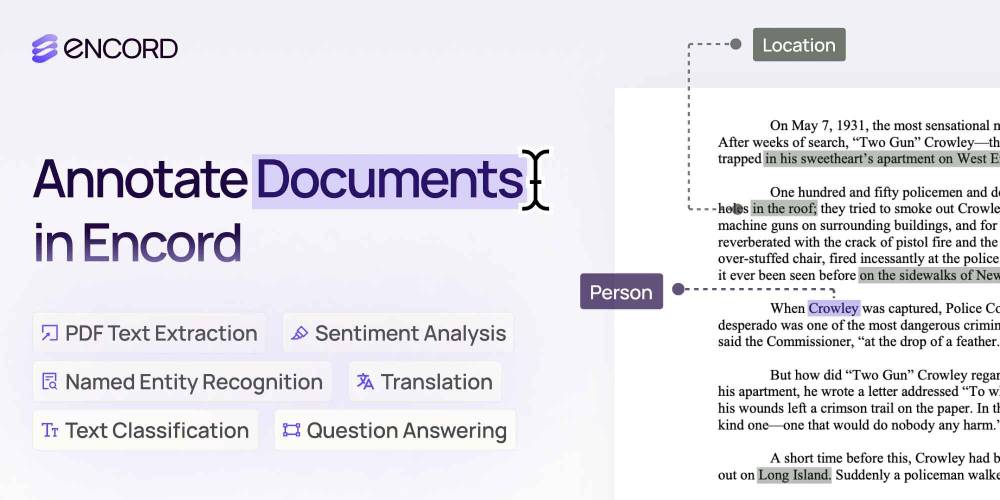
| Label Documents Faster with Multimodal Context |
Encord just released PDF and text annotation tools, enabling AI teams working on LLMs and NLU models to manage, curate, and label document data like PDFs and .txt files. Key features include: - Support for NER, sentiment analysis, text classification, and more.
- Faster document annotation with the agentic data workflow builder.
- Integration of SOTA models like OpenAI’s GPT-4 and Google’s Gemini Pro 1.5 for automatic text and content classification.
Label documents faster with multimodal context. |
|
Get started
| partner with us |
|
|
|
TRENDING SIGNALS
| Grok API |
|
⇧ 1,709 Likes | |
Game Generation |
|
⇧ 12,425 Likes | |
Audio Generation |
|
⇧ 871 Likes | |
Audio Generation |
|
⇧ 1,923 Likes | |
Code Assistance |
| ⇧ 962 Likes |
| |
| |
|
|
Webinar: Deploy LLMs with insights from NVIDIA and Fiddler AI
| NVIDIA and Fiddler AI share secrets on inference, guardrails, observability to deploy LLMs: engineering webinar
Join Engineering Webinar: NVIDIA and Fiddler AI share secrets on inference, guardrails, observability to deploy LLMs
|
Register for webinar now |
|
|
|
|
TOP TUTORIALS
| Prompt Engineering |
| ⇧ 4,099 Likes |
This tutorial teaches you to master effective prompting in generative AI through five clear steps. Learn to save time on tasks, analyze data, and enhance project outcomes. Complete hands-on exercises and build a library of reusable prompts in under 10 hours. |
| Deploying LLM |
|
⇧ 2,892 Likes |
This tutorial covers deploying Gemma 2 with multiple LoRA adapters on Google Kubernetes Engine (GKE) using Hugging Face Text Generation Inference (TGI). Learn to configure GKE with GPU support, manage tokens securely, deploy with kubectl, and perform task-specific inference efficiently. Achieve cost savings and scalability with a single base model. |
| AI Agent |
|
⇧ 26,044 Likes |
This tutorial teaches you to build an AI research agent using LangGraph. Learn to leverage GPT-4o, Pinecone, arXiv, and Google via SerpAPI to create multi-step LLM agents for in-depth research. Gain control over agent execution paths and enhance your research capabilities with practical examples and hands-on guidance. |
| |
| |
|
|
HOW TO
| LLM | How to get started with Anthropic's Claude SDK |
⇧ 7,594 Likes |
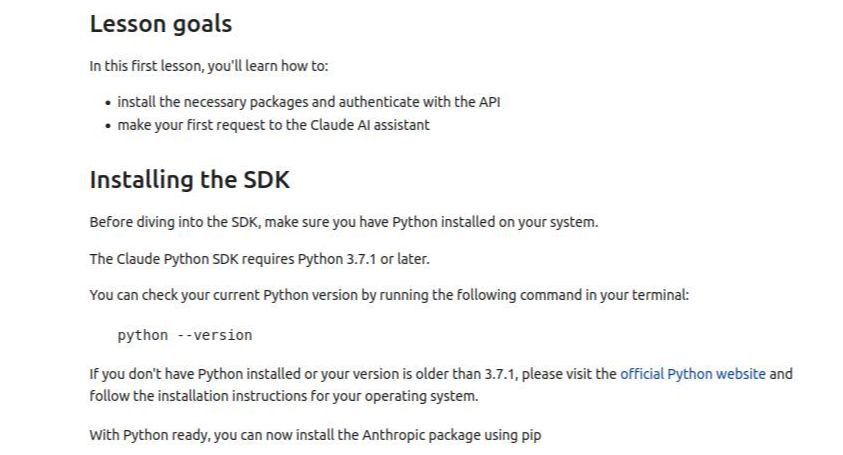
| This guide walks you through using the Claude SDK to interact with Claude, an AI assistant from Anthropic. Claude 3.5 Haiku improves performance across various tasks, such as code completion, chatbots, data extraction, and content moderation. It provides fast speeds and accurate responses, making it suitable for user-facing applications.
You'll learn
- How to install and set up the Claude SDK for Python
- Methods for securely storing and loading sensitive API keys using environment variables
- How to create a client object for interacting with the Claude API
- Techniques for making requests to the Claude AI assistant and processing responses
- Basic usage patterns for the Claude API, including sending messages and receiving outputs
Step-by-step implementation
- Step 1: Install the Anthropic SDK using pip
- Step 2: Install the python-dotenv package for managing environment variables
- Step 3: Create a .env file in the same directory as your notebook or script and add your API key
- Step 4: Import the necessary modules and load your API key
- Step 5: Instantiate the client object to interact with the Claude API
- Step 6: Use the messages.create() method to send a message to Claude and receive a response
|
|
Read more
|
|
|
|
|
At Alpha Signal, our mission is to build a sharp, engaged community focused on AI, machine learning, and cutting-edge language models, helping over 200,000 developers stay informed and ahead. We’re passionate about curating the best in AI, from top research and trending technical blogs to expert insights and tailored job opportunities. We keep you connected to the breakthroughs and discussions that matter, so you can stay in the loop without endless searching. We also work closely with partners who value the future of AI, including employers and advertisers who want to reach an audience as passionate about AI as we are.
Our partnerships are based on shared values of ethics, responsibility, and a commitment to building a better world through technology.Privacy is a priority at Alpha Signal. Our Privacy Policy clearly explains how we collect, store, and use your personal and non-personal information. By using our website, you accept these terms, which you can review on our website. This policy applies across all Alpha Signal pages, outlining your rights and how to contact us if you want to adjust the use of your information. We’re based in the United States. By using our site, you agree to be governed by U.S. laws. |
|
|
|
Looking to promote your company, product, service, or event to 200,000+ AI developers? Let's work together.
|
|
Work with us
|
|
|
|
|
