Hey, | Welcome to today's edition of AlphaSignal.
Whether you are a researcher, engineer, developer, or data scientist, our summaries are there to keep you up-to-date with the latest breakthroughs in AI.
Let's get into it!
Lior | . |
|
|
|
IN TODAY'S SIGNAL
| Top News
Latitude
Top 5 Signals
mlcon
Top Repos
PR-Agent: AI-Powered tool for automated Pull Request analysis, feedback, suggestions
Tarsier enhances LLM-web page interaction,
RT-DETR outperforms YOLOs in speed and accuracy on object detection
PyTorch Tip |
Read Time: 4 min 42 sec |
|
|
|
Enjoying this newsletter?
Please forward it to a friend or colleague. It helps us keep this content free.
|
|
|
|
TOP NEWS
| Language Models |
|
| ⇧ 4728 Likes |
 |
What's New |
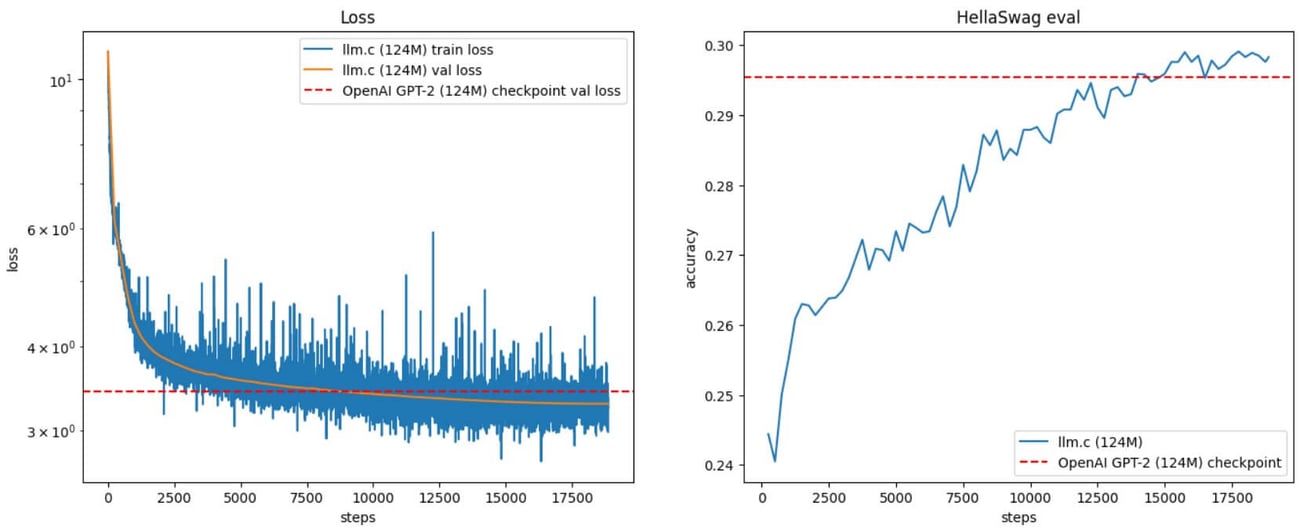
Karpathy released a method to train GPT-2 models quickly and cost-effectively. Training a tiny GPT-2 (124M parameters) model takes about 90 minutes and $20 using an 8xA100 GPU. The 350M version requires 14 hours and around $200. Training the full 1.6B model takes one week and $2.5k.
llm.c: LLM Training in Pure C/CUDA
This release is part of Karpathy’s llm.c repository, which focuses on LLM training in simple, pure C/CUDA. There’s no need for large frameworks like PyTorch (245MB) or cPython (107MB).
Training GPT-2 on CPU (fp32) requires about 1,000 lines of code in train_gpt2.c, while GPU training (with CUDA kernels) uses about 3,000 lines in train_gpt2.cu. The code compiles and runs instantly, matching the PyTorch reference implementation and slightly exceeding its speed.
FineWeb Dataset
The training uses the FineWeb dataset, considered higher quality than the original WebText. FineWeb comprises simple English text with minimal math or code, enabling more efficient model capacity use and addressing diminishing returns seen in the original GPT-2’s 100B tokens.
Code Snippets
To start GPU training, follow these steps: pip install -r requirements.txt
python dev/data/tinyshakespeare.py python train_gpt2.py make train_gpt2cu
./train_gpt2cu
Training Instructions
Karpathy provides detailed setup instructions. Key training parameters include:
- Batch size: 64
- Sequence length: 1024 tokens
- Total batch size per update: 524,288 tokens These configurations achieve about 60% model flops utilization on the A100 GPU.
Key Innovations and Metrics
The core innovation is the use of llm.c, a C/CUDA implementation for efficient model training. The training process on an 8xA100 GPU achieves around 178K tokens per second, with initial training loss at 7.577, targeting a final loss of about 3.29.
Future Plans and Hardware Considerations
Karpathy plans to explore the RedPajama dataset, which might better represent WebText, and aims to improve llm.c’s core functionalities. There is also a focus on adding multi-node training support. Transitioning to H100 GPUs could further reduce training costs, though availability remains a challenge.
Important Specifications
- 124M model: 90 minutes, $20
- 350M model: 14 hours, $200
- 1.6B model: 1 week, $2.5k
|
|
|
Check the repo
|
|
|
|

| Deploy Your GPUs in Seconds: Readers Get 10% OFF | Accelerate your AI training, fine-tuning, and inference workloads with dedicated instances powered by NVIDIA’s H100 Tensor Core GPUs, high-performance networking, and enterprise-grade hardware designed for Machine Learning engineers.
Use Latitude.sh’s amazingly fast platform to deploy AI clusters in seconds. Their super intuitive dashboard and pre-installed AI software get you from zero to training with just a few clicks.
Get instant access to on-demand plans with no upfront commitment and deploy instances according to your specific needs: options ranging from 1x to 8x H100 GPUs are available today!
Alphsignal readers get 10% off during your first 3 months, just use the code G3OFF10
|
|
Get started
| partner with us |
|
|
|
TRENDING SIGNALS
| Code Assistants |
|
⇧ 1561 Likes | |
Voice |
| ⇧ 1029 Likes |
| Browser |
|
⇧ 921 Likes | |
Depth Estimation |
| ⇧ 881 Likes
| | Web Development |
|
⇧ 1102 Likes | | |
|
|
|
|
Last chance! Free registration for mlcon 3, the AI & ML developers conference
| Join 13,000+ AI & ML developers. With topics such as bringing generative AI to production and optimizing your AI infrastructure.
|
Sign up ↗️ |
|
|
|
TOP REPOS
| Coding Tools | |
☆ 4471 Stars | PR-Agent is a collection of tools and features built around leveraging LLMs to assist with various tasks related to code review and development workflows in a collaborative software environment.
It provides capabilities like: automatically generating pull request (PR) descriptions, summaries, code walkthroughs, and labels.
it can also perform automated code reviews, provide adjustable feedback on potential issues, security concerns, and review effort estimations.
it offers code suggestions for improving PRs, answers free-text questions about the code changes, automatically updates changelogs, finds similar issues or code components, and generates documentation for changed methods, functions, and classes. |
| Web Agents |
| ☆ 1161 Stars |
Tarsier is a tool suite that solves the following problems regarding using LLMs for web interaction: - Feeding the webpage to the LLM (HTML, Accessibility Tree, Screenshot)
- Mapping LLM responses back to web elements
- Informing a text-only LLM about the page's visual structure
Tarsier visually tags interactable elements on a page (buttons, links, or input fields) for an LLM to take actions upon. The repo also presents an OCR algorithm to convert a page screenshot into a whitespace-structured string (almost like ASCII art) that an LLM even without vision can understand. | | Object Detection | |
☆ 1481 Stars |
This repository is the official implementation of the paper DETRs Beat YOLOs On Real-Time Object Detection.
It presents Real-Time DEtection TRansformer (RT-DETR, aka RTDETR), the first real-time end-to-end object detector, outperforming previously advanced YOLOs in both speed and accuracy.
The repository contains the code and the weights associated with the different versions of the RT-DETR model, that have between 20 an 76 million parameters. | | |
|
|
|
|
PYTORCH TIP
| Model Training | Using PyTorch's "bottleneck" module |
The "torch.utils.bottleneck" module is a powerful tool that can help you identify performance bottlenecks in your PyTorch code, allowing you to optimize your models and training processes for improved efficiency.
This module provides different modes, such as 'cpu' for profiling CPU-bound operations and 'cuda' for profiling CUDA kernels, allowing you to pinpoint bottlenecks in different parts of your PyTorch pipeline.
After running the code snippet below, calling bottleneck.show_bottlenecks() will display a report highlighting the most time-consuming operations in your PyTorch code, along with their execution times, GPU utilization, and other relevant metrics.
Here's how you can use this module in an easy example: |
import torch
from torch.utils.bottleneck import bottleneck

model = YourModelDefinition()
inputs = torch.randn(batch_size, input_shape)

with bottleneck(mode='full'):
    outputs = model(inputs)
    loss = loss_function(outputs)
    loss.backward()

bottleneck.show_bottlenecks()
|
|
|
|
Ghita is an editor at AlphaSignal and AI Engineer at Clear Ventures. Experienced in Computer Vision and Language models, she holds 2 masters in Applied Mathematics.
| | | |
Want to promote your company, product, job, or event to 180,000+ AI researchers and engineers?
|
|
Sponsor
|
|
|
|
|
