
Cursor's Auto-Review Cuts Agent Interruptions by 80% Without Sacrificing Safety
Cursor's new Auto-review uses a classifier subagent to gate risky agent actions, cutting interruptions from 40% to 7% while keeping agents running freely on safe tasks.
Takeaways
- Cursor launched Auto-review, now the default for all new users, using a classifier subagent to govern agent actions.
- A three-stage filter routes tool calls through an allowlist, a sandbox, or a classifier subagent that can allow, block, or escalate to the user.
- The classifier is agentic -- it can inspect workspace files with ReadFile/Grep before deciding if a command like
python script.pyis safe. - Only 7% of chats lead to a user interruption, down from ~40% seen at some enterprise customers using prior approval-heavy setups.
- Cursor warns it is "best-effort convenience, not a security boundary" -- the classifier is non-deterministic and should not be used near production credentials.
- Existing users can enable it at Settings > Agents > Run Mode and write custom instructions to tune the classifier's behavior.
Letting an AI agent run freely in your codebase is a double-edged sword. Give it too little autonomy and you spend your day clicking "approve" on every shell command. Give it too much and it might touch production credentials, follow a malicious instruction injected from a file, or make an irreversible change you never intended. Cursor's new Auto-review is a direct attempt to thread that needle, and the engineering behind it is more interesting than a simple permission toggle.
The approval-fatigue trap
Greater autonomy introduces security risks when agents take unintended actions, and this is especially true for local agents that run near files, credentials, environment variables, MCP tools, and have access to production systems. The naive fix is to ask the user before every action, but Auto-review makes decisions around agent autonomy behave more like a dial than a switch: an agent should be able to move freely when the stakes are low, but slow down when its next action crosses a meaningful boundary.
This matters because the approval-prompt model has a known failure mode. After enough repeated interruptions, users stop reading carefully, and the approval flow becomes theater rather than safety. The goal with Auto-review is to make interruptions rare enough that they actually get attention when they happen.
A three-stage filter, not a single gate
Cursor now routes each tool call through a three-stage filter: an allowlist runs trusted calls instantly, a sandbox isolates anything that can be contained, and a classifier subagent decides what to do with everything else. It applies to Shell, MCP, and Fetch tool calls.
- Allowlist: Known-safe commands execute immediately with no review overhead.
- Sandbox: Some calls aren't on the allowlist but Cursor can run them in a sandbox where they can't damage the real environment. The sandbox limits filesystem and network access. The call completes, the agent sees the output, but local state isn't affected.
- Classifier subagent: A small reasoning agent embedded in the main agent loop reads the proposed action, applies whatever custom instructions you have given it, and decides. It can evaluate context, not just match strings.
The context-awareness of the classifier is what separates it from a rule-based blocklist. Whether an agent action poses risk depends on the situation. The same command can be harmless in one workflow and unacceptable in another. What matters is the relationship between the action, the user's request, and the consequence of being wrong.
How the classifier was built
Building a fast, accurate classifier that sits in the hot path of every tool call is a hard engineering problem. Cursor avoided a separate classification endpoint, because an extra round trip would add latency directly before every reviewed tool call. Instead, the classifier runs in the same RPC stream as the parent agent, using an architecture similar to subagents.
One counterintuitive finding during development: less sophisticated models weren't always faster. When models struggled with policy or tool calls, they consumed more resources for poorer outcomes. A small, capable model proved to be the optimal trade-off.
The classifier is also agentic itself. The classifier was designed to be agentic, allowing it to inspect the workspace using tools like ReadFile or Grep when a command alone isn't sufficient. For example, the safety of running a Python script depends on its contents. A command like python script.py tells you almost nothing on its own.
The eval set: 6,122 labeled rows and synthetic worst-cases
Cursor built a rigorous evaluation pipeline to tune the classifier. They started with roughly 12 hours of internal developer sessions, then deduplicated common actions into 6,122 labeled rows. But real sessions don't surface the dangerous edge cases often enough, so they supplemented with synthetic data.
The synthetic cases covered scenarios where the agent might:
- Read secrets or credentials from the workspace
- Touch production data
- Follow untrusted instructions injected from an external source
- Take actions with large, hard-to-reverse side effects
They also tested for flapping -- a stability problem where the classifier allows the same action six times and blocks it four times, indicating the policy or prompt is underspecified. The team determined where an action sits along the risk continuum with a specialized classifier agent that reviews actions in context before they run. Repeated runs on the same cases helped tighten the classifier until its behavior was consistent.
The numbers that matter
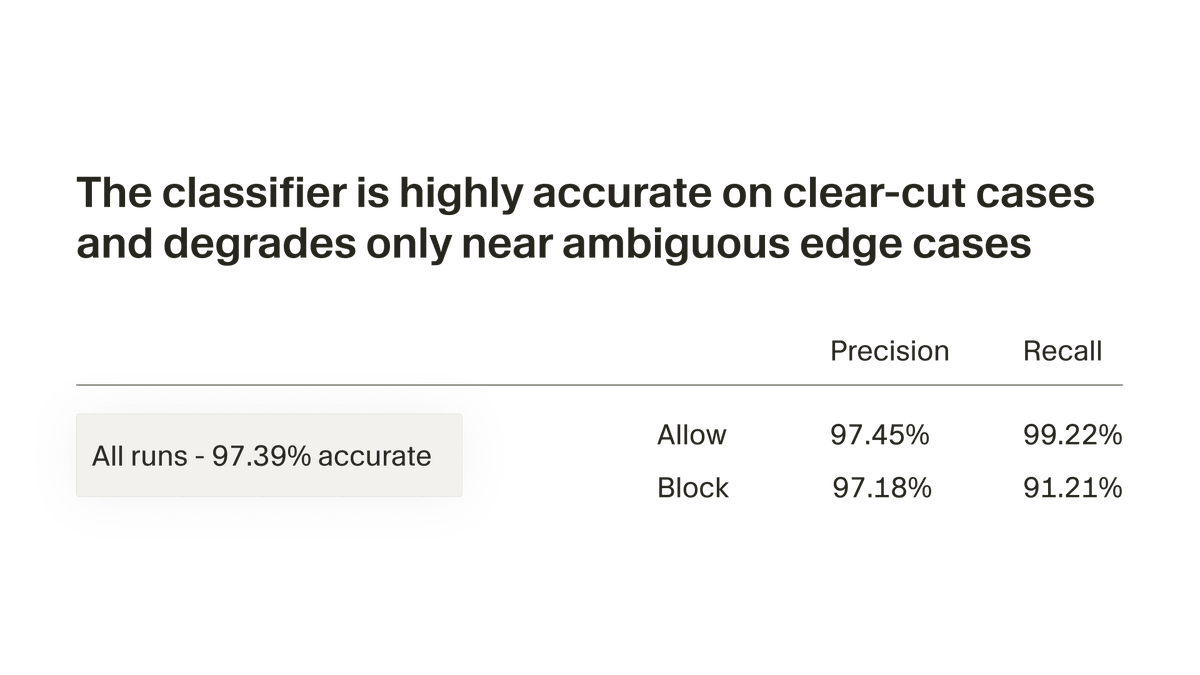
The headline accuracy figure is 97%, with most misses concentrated near genuinely ambiguous edges. But the operational metrics are arguably more telling:
- The classifier currently blocks around 4% of actions, though a block does not immediately become a user prompt.
- Only about 7% of total chats in Auto-review mode lead to at least one interruption.
- Some enterprise customers previously saw roughly 40% of actions blocked within their organization -- a reduction of more than 80 percentage points.
When the classifier does block something, it doesn't immediately surface a dialog to the user. When it blocks an action, it returns an explanation to the parent agent, and the parent agent can often use that feedback to choose a safer path without interrupting the user. The agent self-corrects first; only if it can't find a safer path does the user get pulled in.
The limits Cursor is honest about
Cursor explicitly says Auto-review is "best-effort convenience, not a security boundary." The classifier is non-deterministic and can miss bad calls or block good ones. This is an important caveat. Use it for sandboxed development. Do not point it at production credentials, mutating MCP servers, or any environment where a wrong call has irreversible consequences.
The broader threat landscape also puts this in context. Researchers caught the first malicious MCP server in the wild -- a package that shipped fifteen clean versions, building legitimacy, before quietly adding a single line of exfiltration code. Tool poisoning is the new prompt injection: attackers hide instructions inside tool metadata that the agent reads but the user cannot see. A contextual classifier helps, but it is one layer of defense, not a complete solution.
Where this fits in the broader race for bounded autonomy
The 2026 pattern across every AI coding tool is bounded autonomy -- agents that run confidently within defined limits and escalate cleanly when those limits are reached. Claude Code uses step-level approval gates. Codex CLI added per-server MCP environment targeting. Cursor's classifier subagent is the most autonomous implementation of the three: it reasons about the action rather than applying a fixed policy.
The engineers who will get the most out of Auto-review are not the ones who type fastest or know the most APIs. They are the ones who understand how to configure and constrain agentic systems: engineers who think in terms of trust boundaries, execution policies, and blast radius. Writing good custom instructions for the classifier -- telling it things like "never call external domains other than our API" -- is now a meaningful part of setting up a Cursor workspace.
How to enable it
Auto-review is now the default run mode for all new Cursor users. Existing users can turn it on at Settings > Agents > Run Mode. The same panel lets you write custom instructions to steer the classifier. Users can configure the run mode and customize the classifier agent's behavior via settings and custom instructions.
The feature is currently focused on local agents in the desktop app, and Cursor says they expect the same ideas to shape how they govern agent autonomy in more places over time. The real question is whether a 97%-accurate, non-deterministic classifier is good enough for the environments where you actually need safety guarantees. For most development workflows, it almost certainly is. For anything touching production, the answer is still: don't let the agent go there at all.