
OpenAI's Codex Now Debugs Live Browsers Like a Real Developer
Codex's in-app browser gains full Chrome DevTools Protocol access, letting the agent profile JS, inspect network traffic, and debug live pages autonomously.
Takeaways
- Developer Mode launched: Codex gains full Chrome DevTools Protocol (CDP) access for live browser debugging in both the in-app browser and Chrome extension.
- What Codex can now see: JavaScript performance profiles, network traffic, console output, runtime errors, DOM state, and applied styles -- all programmatically.
- Opt-in by default: Enable via Settings > Browser > Enable full CDP access; admins can disable it workspace-wide via
browser_use_full_cdp_access = false. - 2x browser speed boost: CDP and DOM snapshot optimizations reduce browser round trips, making all browser-use tasks significantly faster.
- Security guardrail: Codex requests explicit per-site approval before using full CDP access, given its access to sensitive browser internals.
- Pricing unchanged: Available on existing Codex plans (Plus at $20/mo, Pro 5x at $100/mo); no additional charge for the CDP feature. See pricing.
OpenAI just gave Codex's browser tooling a significant upgrade: a new Developer Mode that hands the agent direct access to the Chrome DevTools Protocol (CDP). In plain terms, CDP is the same low-level wire protocol that powers Chrome's built-in DevTools panel -- the one you open with F12. Now Codex can use it programmatically, without you having to copy-paste stack traces or screenshots into a chat window.
What the agent can actually see now
Before this update, Codex's in-app browser was useful for visual review -- you could point it at a local dev server, leave comments on rendered elements, and ask Codex to fix layout issues. But the agent was essentially looking at a screenshot. It had no programmatic window into what the page was actually doing at runtime.
Developer Mode gives Codex controlled Chrome DevTools Protocol (CDP) access for performance profiling and deeper debugging of network traffic, console output, runtime errors, and page state. That is a meaningful jump in capability. The agent can now:
- Profile JavaScript execution and identify slow functions
- Inspect all network requests and their responses
- Read console logs and runtime error messages
- Examine the live DOM state and applied CSS styles
- Download and extract image assets from a page
Previously, Codex could assist with code generation and analysis, but its ability to directly debug and test the user-facing aspects of a web application was limited. By enabling full CDP access, Codex can now perform actions such as inspecting network requests, monitoring console logs, and diagnosing runtime errors -- much like a developer would using traditional browser developer tools.
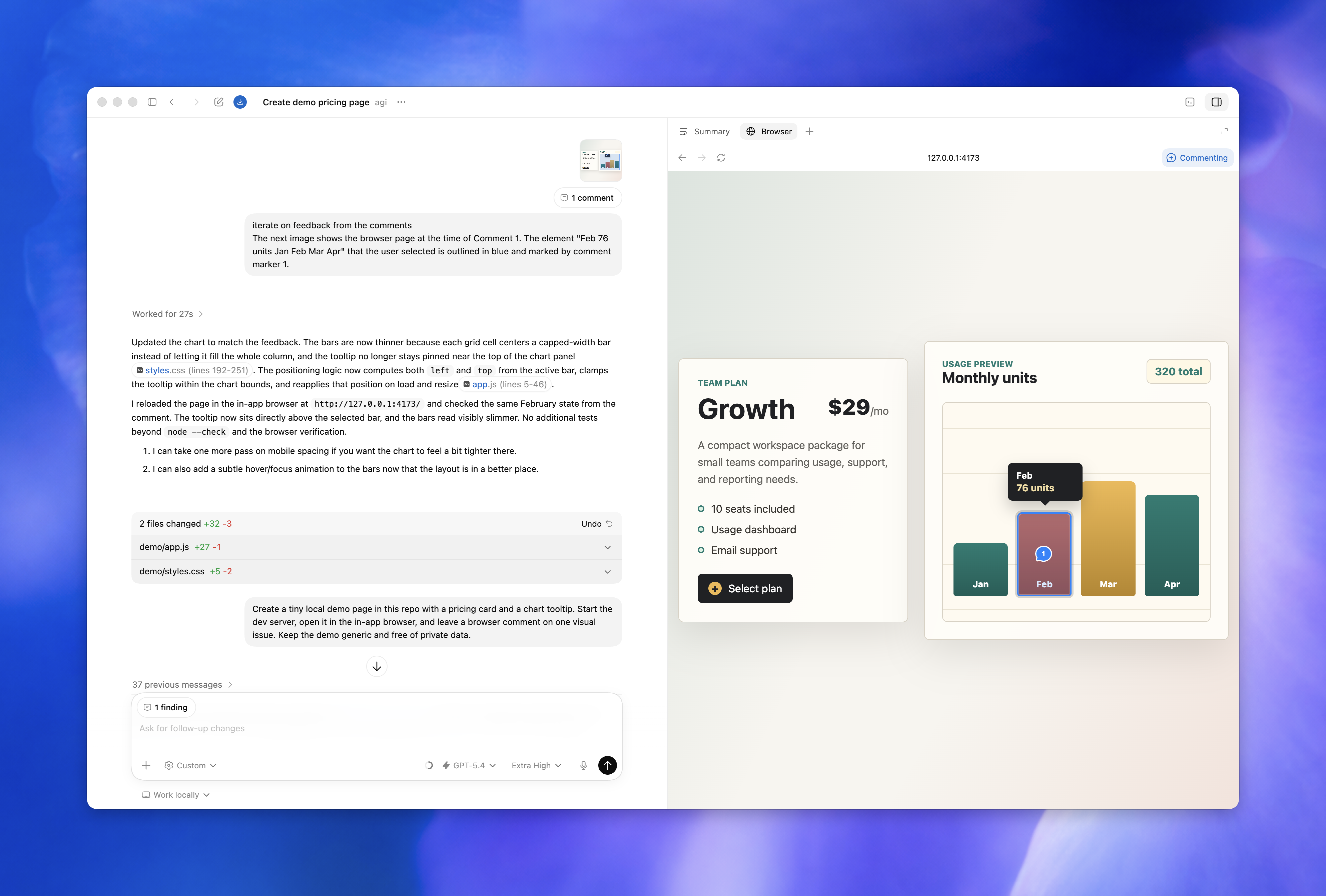
Two surfaces, one protocol
Developer Mode works with Browser use in Chrome and the Codex in-app browser. It gives Codex controlled access to Chrome DevTools Protocol for deeper browser debugging, such as inspecting console output, network traffic, page state, and JavaScript performance. So whether you are running a local dev server inside the Codex app or working through the Chrome extension on a signed-in site, the same deeper debugging capabilities apply.
The two browser surfaces serve different purposes and are worth keeping straight:
- In-app browser: Use it for local development servers, file-backed previews, and public pages that don't require sign-in. For anything that depends on login state or browser extensions, use your regular browser or the Codex Chrome extension.
- Chrome extension: The Codex Chrome extension lets Codex use Chrome for browser tasks that need your signed-in browser state. Use it when Codex needs to read or act on sites such as LinkedIn, Salesforce, Gmail, or internal tools.
Turning it on (and the security tradeoff)
To enable it, open Settings > Browser and, under Developer mode, turn on Enable full CDP access. The feature is turned off by default at the user level. That default-off posture is deliberate.
Full CDP access lets Codex inspect and control sensitive browser internals that may put your data at risk, and Codex asks for explicit approval before it uses full CDP access to inspect a website. For teams, admins and owners can turn off the feature for their workspace by accessing the Policies & Configurations in Codex cloud settings, and by setting browser_use_full_cdp_access to false. Note that admins will first need to enable the in-app browser before enabling Developer Mode.
Speed improvements came along for the ride
Developer Mode was not the only browser-related change in this release. Browser use was made up to 2x faster through CDP and DOM snapshot optimizations that reduce browser round trips. Codex can now download and extract all image assets from a page much more quickly, and can extract structured data from pages more effectively and find information more quickly with a read-only JS sandbox.
Where this fits in the bigger picture
OpenAI's Codex now has more than 5 million users, up nearly 4x from earlier this year. The CDP integration is part of a broader push to make Codex a genuine autonomous engineering agent rather than a sophisticated autocomplete tool. The gap it closes is real: an agent that can write code but cannot observe how that code behaves in a live browser is fundamentally limited for frontend and full-stack work.
The practical use cases where this matters most:
- Performance debugging: Ask Codex to identify why a page is slow -- it can profile JS execution and pinpoint the bottleneck without you needing to interpret a flame graph.
- Network issue diagnosis: Failed API calls, CORS errors, and unexpected response payloads are now visible to the agent directly.
- Runtime error triage: Console errors that only appear in a running app, not in static analysis, are now part of Codex's context.
- Visual regression verification: After making a code change, Codex can load the page, inspect the DOM, and confirm the fix landed correctly.
Developer Mode is available now as part of the existing Codex app. The practical entry point for working developers is the Plus plan at $20/month, which includes cloud task delegation, GitHub code review, and Slack integration. For heavier usage, the Pro 5x tier at $100/month gives 5x more usage for 5x the price. The CDP feature itself does not carry an additional charge on top of your existing plan.