| Hey, | Welcome to AlphaSignal – the most read newsletter by AI developers.
We bring you the top 1% of news, papers, models, and repos, all summarized to keep you updated on the latest in AI. |
|
|
|
IN TODAY'S SIGNAL
| Read time: 6 min 07 sec | 🎖️ Top News
📌 Atla AI
⚡️ Trending Signals
Sam Altman reveals that OpenAI has trained a new model that delivers standout creative writing, capturing metafiction’s nuanced vibe.
Qwen enhances its chat with multimodal AI with unified interface, video analysis, guest access and mobile upgrades.
Perplexity announces Windows app with AI search, voice dictation, and keyboard shortcuts.
LangChain releases Agent Chat UI, an open-source web app for interacting with LangGraph apps via chat.
Qodo introduces agent-driven workflows and MCP integration in its AI IDE plugin, Qodo Gen, streamlining code generation, testing, and chat.
💻 Top Tutorials
🧠 How To |
|
|
|
If you're enjoying AlphaSignal please forward this email to a colleague.
It helps us keep this content free. |
|
|
|
TOP NEWS
| Agent Tools | OpenAI unveils Responses API: Built-in web search and file retrieval, open-source Agent SDK for automation
| ⇧ 19,482 Likes |
| What's New |
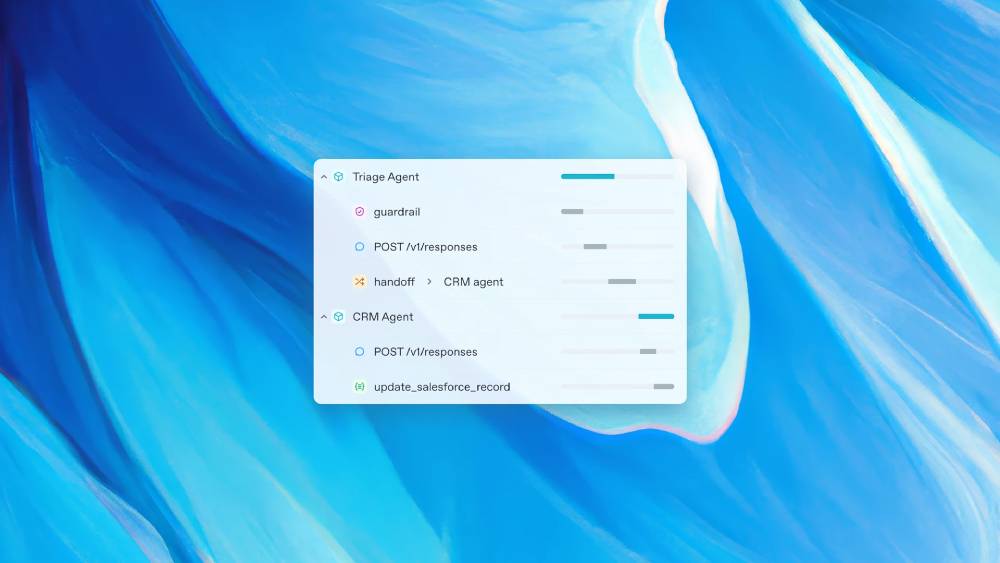
OpenAI introduces the Responses API and Agents SDK to help you build AI agents with built-in tools.. This API integrates built-in tools for web search, file retrieval, and computer interaction, allowing models to execute complex workflows without external APIs. It replaces the Assistants API, offering more autonomy and reducing setup complexity.
Web Search Integration The Responses API includes a built-in web search tool for real-time data retrieval. - It outperforms retrieval models on SimpleQA for live information queries achieving 90% accuracy.
- You can use it for fact-checking, competitive analysis, and automated research workflows.
- Returns real-time results with source links.
- Unlike static models, it pulls live data, improving response accuracy.
File Search and Retrieval
The API allows AI agents to search and retrieve information from files. - Supports document-based knowledge management, compliance checks, and automated reporting.
- Handles structured and unstructured file formats.
Computer-Using Agent (CUA)
The CUA tool enables AI agents to interact with software and automate workflows.
- Simulates human interactions for data entry, research, and automation tasks.
- Achieves 38.1% on OSWorld, 58.1% on WebArena, and 87% on WebVoyager.
- Works without predefined scripts, making it adaptable for various applications.
Agents SDK This open-source SDK simplifies AI workflow automation with multi-agent coordination. - Works with OpenAI models and third-party LLMs supporting Chat Completions.
- Supports agent handoffs, tracing, and input validation.
Availability and Access
The Responses API and built-in tools are available to all developers starting today. - Web Search: Available in preview.
- File Search: Open to all.
- Computer Use: Available as a research preview for select developers in usage tiers 3-5.
The Agents SDK is open-source and can be installed via 'pip install openai-agents'. A JavaScript version is in development.
Community Feedback
Tom Boyle
"The Agents SDK is a game-changer. Finally, a proper framework for building AI workflows at scale."
Rafael Bittencourt
"I’m curious about the future of Custom GPTs, considering they are currently based on the Assistants API. Will they be migrated to the new Responses API?"
Rudi Ranck
"OpenAI is entering the game that LangChain has been in for a while. However, it's now offering API access to its web search, operator, and file search tools. It’s still missing the deep research, but until then, we can use Perplexity's deep research API. I'll stick with LangGraph and explore these new tools through the API."
| |
|
| Try now
|
|
|
|
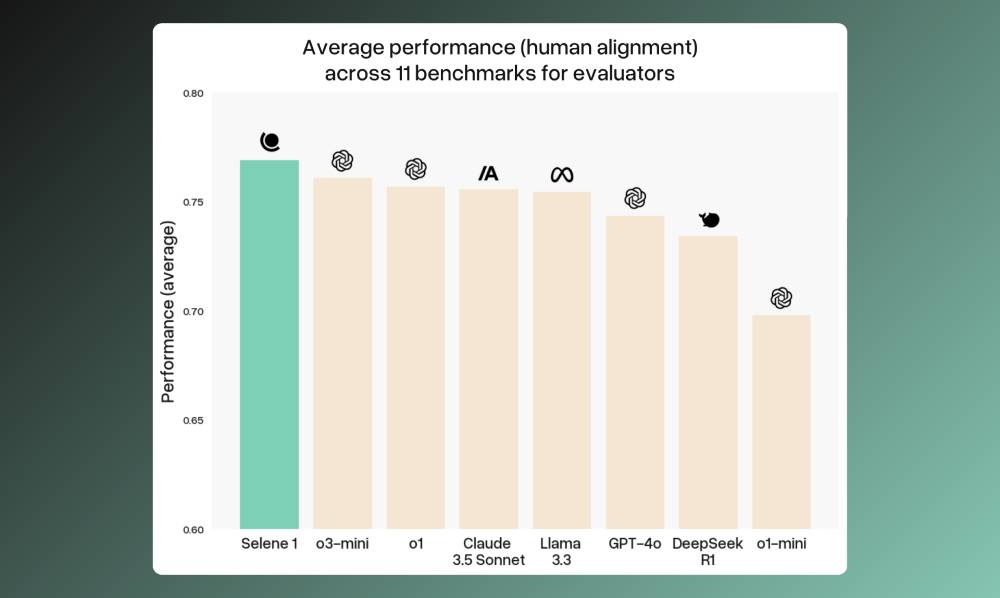
| Build and run custom evals with a state-of-the-art LLM Judge | AI apps need reliable evals to ensure they work as expected. Atla provides tools for running accurate, customized evaluations that measure what matters.
- Selene 1: An LLM Judge optimized for evaluation tasks. It outperforms models like OpenAI’s O-series and Claude 3.5 on 11 key benchmarks, covering scoring, classification, and pairwise comparisons.
- Alignment Platform: Easily create, test, and refine custom eval metrics with minimal prompt engineering. Deploy Selene 1 to run tailored evals that align with your use case.
Perfect for AI app builders needing accurate performance judgments, whether fine-tuning models, comparing outputs, or monitoring production.
Run evals that match your AI’s needs. |
| Start now
| partner with us → |
|
|
|
TRENDING SIGNALS
| AI Models |
|
⇧ 12,378 Likes | |
Chatbot |
|
⇧ 1,836 Likes | |
AI Tool |
|
⇧ 1,538 Likes | |
AI Tool |
|
⇧ 729 Likes | |
AI Tool |
|
⇧ 538 Like | | |
|
|
|
|
TOP TUTORIALS
| MCP Setup |
| ⇧ 2,846 Likes |
Learn how to set up a Model Context Protocol (MCP) server using TypeScript in this tutorial. You'll create a simple server, add tools with Zod schemas, and connect it to Claude code. The tutorial also covers integrating commands like weather queries, enhancing local setups with MCP tools. |
| Coding Tool |
| ⇧ 451 Likes |
Learn how to replace outdated .cursorrules with Cursor’s Project Rules for better control over AI-generated code. Modular .mdc files allow for precise, targeted rules, improving accuracy, scalability, and code quality. This tutorial covers setting up general, frontend, and backend rules, and offers best practices for efficient project management. |
| Edge AI |
| ⇧ 329 Likes |
This tutorial shows you how to run LLMs locally on mobile devices using React Native. You’ll learn to set up the environment, select models like Distil Qwen 2.5, and build an app that loads models from Hugging Face. Key steps include downloading models, managing dependencies, and implementing privacy-focused features for offline use. |
| |
| |
|
|
HOW TO
| MCP Setup |
Connect Claude to the Internet Using MCP Servers for Web Searches
| ⇧ 2,148 Likes | Here’s how to connect Claude to the internet using MCP servers:
Step 1
Download the latest desktop version of Claude from claude.ai/download.
Step 2
Sign up for a free Brave Search API key on their portal.
Step 3
Locate your Claude desktop configuration file: - macOS: ~/Library/ApplicationSupport/Claude/claude_desktop_config.json
- Windows: \Claude\claude_desktop_config.json
Step 4
If it’s not there, open Claude’s settings, click “Developer,” and select “Edit Config,” or create the file.
Step 5
Add the following configuration with your API key and save it: |
{
  "mcpServers": {
    "brave-search": {
      "command": "npx",
      "args": ["-y", "@modelcontextprotocol/server-brave-search"],
      "env":
    }
  }
}
| Step 6
Restart Claude and check the “brave-search” option in the settings under “Developer.”
You’re all set to use the Brave Search API with Claude.
|
| Learn more
|
|
|
|
At Alpha Signal, our mission is to build a sharp, engaged community focused on AI, machine learning, and cutting-edge language models, helping over 200,000 developers stay informed and ahead. We’re passionate about curating the best in AI, from top research and trending technical blogs to expert insights and tailored job opportunities. We keep you connected to the breakthroughs and discussions that matter, so you can stay in the loop without endless searching. We also work closely with partners who value the future of AI, including employers and advertisers who want to reach an audience as passionate about AI as we are.
Our partnerships are based on shared values of ethics, responsibility, and a commitment to building a better world through technology.Privacy is a priority at Alpha Signal. Our Privacy Policy clearly explains how we collect, store, and use your personal and non-personal information. By using our website, you accept these terms, which you can review on our website. This policy applies across all Alpha Signal pages, outlining your rights and how to contact us if you want to adjust the use of your information. We’re based in the United States. By using our site, you agree to be governed by U.S. laws. |
|
|
|
Looking to promote your company, product, service, or event to 200,000+ AI developers? Let's work together.
|
| Work with us
|
|
|
|
|
