Hey, | Welcome to this week's edition of AlphaSignal.
Whether you are a researcher, engineer, developer, or data scientist, our summaries ensure you're always up-to-date with the latest breakthroughs in AI.
Let's get into it!
Lior |
|
|
|
IN TODAY'S EMAIL | Read Time: 4 min 28 sec |
|
|
|
TOP REPO | UV: Speeding up pip 100x | 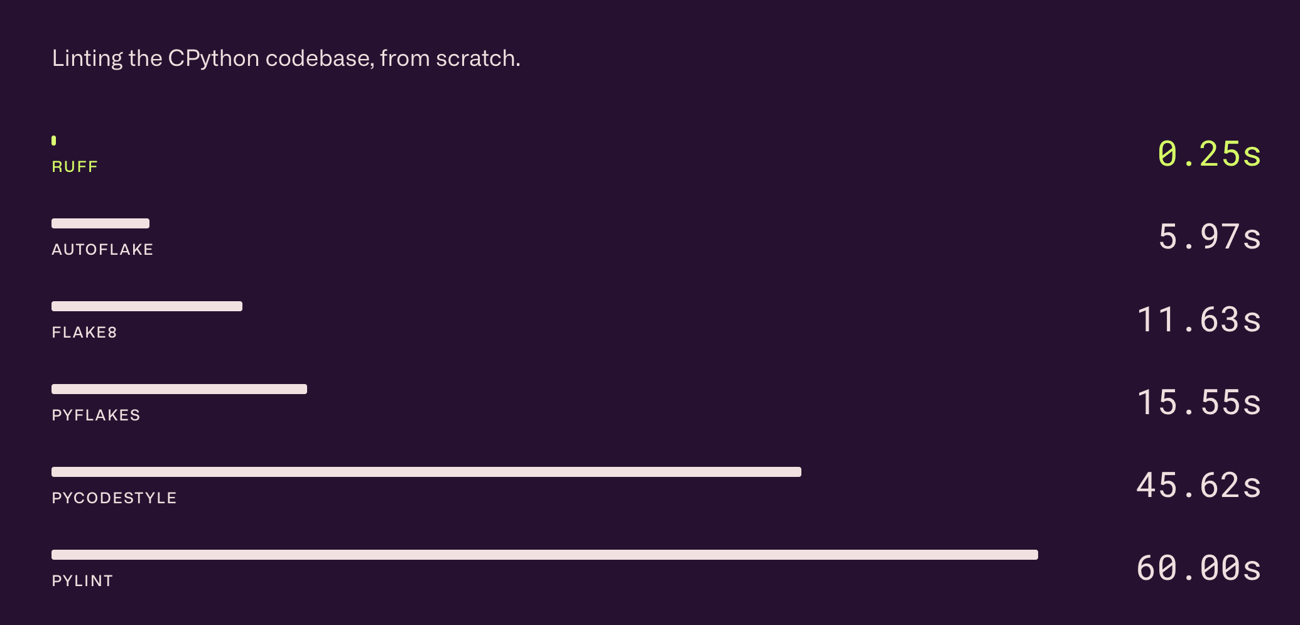 | What's New? | Uv is an extremely fast Python package installer and resolver, written in Rust designed as a drop-in alternative to pip, pip-tools, and virtualenv.
It's 10-100x faster than pip and pip-tools: with a warm cache, uv installs are near-instant.
You can use it in the same way you would use pip to handle Python packages,
What It Allows You To Do: - Faster and More Efficient: uv is much quicker than pip, making installing packages and solving dependencies faster.
- Saves Disk Space: It uses a global cache to save space by not duplicating files you already have.
- Works Everywhere: You can use uv on different systems like macOS, Linux, and Windows.
- Easy to Install: You don't need to have Python or Rust installed to use uv. It can be installed in many ways, like using curl, pip, or brew.
- Supports Advanced Features: uv has special options for managing package versions and dependencies in more detail.
How It Works: - uv is written in Rust, which is known for its speed and safety. This helps make uv much faster than pip.
- It uses a smart way to figure out which versions of packages can work together, called a "resolver." This resolver is very good at solving complex problems quickly.
- uv also has a global cache. This means it remembers files it has already seen, so it doesn't have to download or install them again. This saves time and disk space.
Installing uv: You can easily install uv using terminal commands. For macOS and Linux, a simple curl command will do, while Windows users can use powershell. | | Try uv |
|
|
|
 | [Webinar] Blueprint to AI: Implementing Generative AI Across Your Enterprise | Scale AI and Boston Consulting Group share their blueprint to AI and lessons learned from implementing Generative AI for the world’s largest enterprises.
Join Scale and BCG on February 27th at 10 AM PT where you’ll learn: How leaders overcome challenges implementing Generative AI across their organizations
How to unlock the value of proprietary data and customize Generative AI systems with fine-tuning and retrieval augmented generation (RAG)
What infrastructure and tools, like test and evaluation, are needed to proactively address requirements for production deployment and accelerate the path to value
If your organization is looking to leap past the competition by leveraging AI, you won't want to miss this. | | Register now (free) | partner with us |
|
|
|
TOP OF GITHUB | --------------------- Continue helps you integrate LLMs directly into VS Code and JetBrains, streamlining coding by automating tasks like boilerplate generation, code refactoring, and unit test creation. It supports various LLMs and offers customization for workflow integration. | | --------------------- TensorRT-LLM provides users with an easy-to-use Python API to define Large Language Models (LLMs) and build TensorRT engines that contain state-of-the-art optimizations to perform inference efficiently on NVIDIA GPUs. TensorRT-LLM also contains components to create Python and C++ runtimes that execute those TensorRT engines. | | --------------------- This is the official codebase for Stability's Stable Cascade, a generative model that uses Würstchen architecture for efficient text-to-image conversion, designed for local execution on consumer GPUs. | | --------------------- YOLO-World enhances YOLO with open-vocabulary detection, using vision-language pre-training for zero-shot efficiency. Achieves 35.4 AP, 52.0 FPS on LVIS. Offers prompt-based inference, enabling real-time, open-vocabulary detection without extra training. Pre-trained models available for improved applicability in dynamic environments. | | --------------------- Google's Magika is a novel AI powered file type detection tool that relies on the recent advance of deep learning to provide accurate detection. Magika achieves 99%+ precision and recall on 1M files and over 100 content types (covering both binary and textual file formats). | |
| |
|
|
PYTORCH TIP | logging module | You can use the Use Python’s logging module to streamline your debugging.
These messages can help you understand what's happening in your program or debug issues when they arise.
Here's a simple tip on how to start using logging in your Python code:
First, you need to import the logging module. Then, you set up the basic configuration for the logging system. This setup can include where you want the log messages to go (like a file) and how detailed you want the messages to be.
Here is a small piece of code to show how this is done: |
import logging

# Setup basic configuration for logging
logging.basicConfig(
  filename='example.log',level=logging.DEBUG,
  format='%(asctime)s - %(levelname)s - %(message)s')

# Now, you can start using logging
logging.debug('This message will help us debug.')
logging.info('This is an info message.')
logging.warning('This is a warning message.')
logging.error('This is an error message.')
logging.critical('This is a critical message.')
| filename='example.log' tells Python to save the log messages in a file named example.log.
level=logging.DEBUG means that all messages that are debug level or higher will be logged.
The part format = '%(asctime)s - %(levelname)s - %(message)s' sets how each log message is formatted.
It includes the time (%(asctime)s), the message's severity level (%(levelname)s), and the actual message (%(message)s).
By using logging, instead of print statements, your code can easily track what's happening over time, making it easier to understand and fix any problems. |
|
|
|
| | Want to promote your company, product, job, or event to 170,000+ AI researchers and engineers? You can reach out here. | |
|
|
|
|
