The real story isn't one model, it's a pattern: general-purpose AI is quietly eating specialized software. Claude just matched decade-old chemistry tools without a single chemistry-specific fine-tune. That's a business model threat, not a benchmark win.
Meanwhile, BlazeEdit runs full image edits on-device in 290ms. No server, no cost per request.
Foundation models going up into expert territory. Efficient models going down into the hardware. Legacy vendors are getting squeezed from both ends.
|
|
Together with
|
·
|

|
|
|
|

|
Today's Author
Lior Alexander. Founder of AlphaSignal and former ML Engineer. Previously built ML systems at Iguazio, Guesty, Enphase, Mila.
|
|
Top News
|
|
|
|
Anthropic's Claude Opus 4.7 matches dedicated chemistry software on NMR analysis
|
|
3,539 Likes
|
|
Chemistry has a notoriously tedious step: figuring out a molecule's structure. NMR spectroscopy (think of it as a molecular fingerprint scanner using magnetic fields) is the main tool. For every compound, a chemist has to manually match each peak in the spectrum to an atom in the proposed structure by hand. Expensive, specialized software like ChemDraw and MestReNova has owned this space for decades. Anthropic just tested Claude Opus 4.7 against those tools. Here's what stood out: - Opus 4.7, a general-purpose model without chemistry-specific fine-tuning, is now as good as or better than ChemDraw and MestReNova on average.
- Opus 4.7 achieved the most accurate hydrogen predictions, with an average error of just ±0.079 ppm, far below the acceptable margin of ±0.20 ppm.
- On the harder reverse task (deducing a structure from raw data), Opus 4.7 recovered all simpler structures on every attempt, and succeeded on four out of seven denser structures.
A chemist can paste their NMR data into a chat window and get a structural proposal back, no proprietary software license needed. That's the real unlock here.
|
|
|
|
Presented by GitLab
|
|
Where Agentic AI in Engineering Is Headed
|
|
Join GitLab's virtual event on June 10 to see where agentic AI in software development is actually headed: - Stanford SWEPR researchers share new productivity data on AI-era software engineering
- Mercedes-Benz, Google Cloud & AWS share real insights on enterprise AI adoption in practice
- GitLab's product roadmap and new consumption options for the Duo Agent Platform
- Live hands-on workshop: the top 5 agentic use cases, not just slides
APAC & AMER replays are available June 11.
|
|
|
|
Top News
|
|
|
|
OpenAI ships Codex app polish with searchable settings and better state memory
|
|
3,169 Likes
|
|
Codex just got a round of polish updates, and they fix the small annoyances that slow you down daily. The biggest one: settings are now searchable, with results grouped by category. No more scrolling through every section to find one toggle. Here's what else changed: - Side chats stay visible in full screen, so you don't lose context while working
- Your working state survives restarts, including drafts, zoom level, hotkey preferences, and archived sections
- Notifications and unread badges now route to the right place
- Escape stops the correct chat, not a random one
- Prompt links paste back as structured pills, not raw text
The composer also behaves better inside tight panels, which matters if you work with a cramped layout. None of this is flashy. But fewer interruptions means you stay in flow longer, and that adds up fast.
|
|
|
|
Presented by Slack
|
|
Slack vs. Teams: The AI Era Comparison
|

|
Most workplace tools were built for meetings, files, and email - not the fast, cross-functional way teams work today. But in the AI era, the gap between Slack and Microsoft Teams has never been wider. This guide breaks down how the two platforms compare across a range of criteria.
|
|
|
|
Top News
|
|
|
|
Cursor ships Design Mode so you can point and draw UI changes visually
|
|
2,701 Likes
|
|
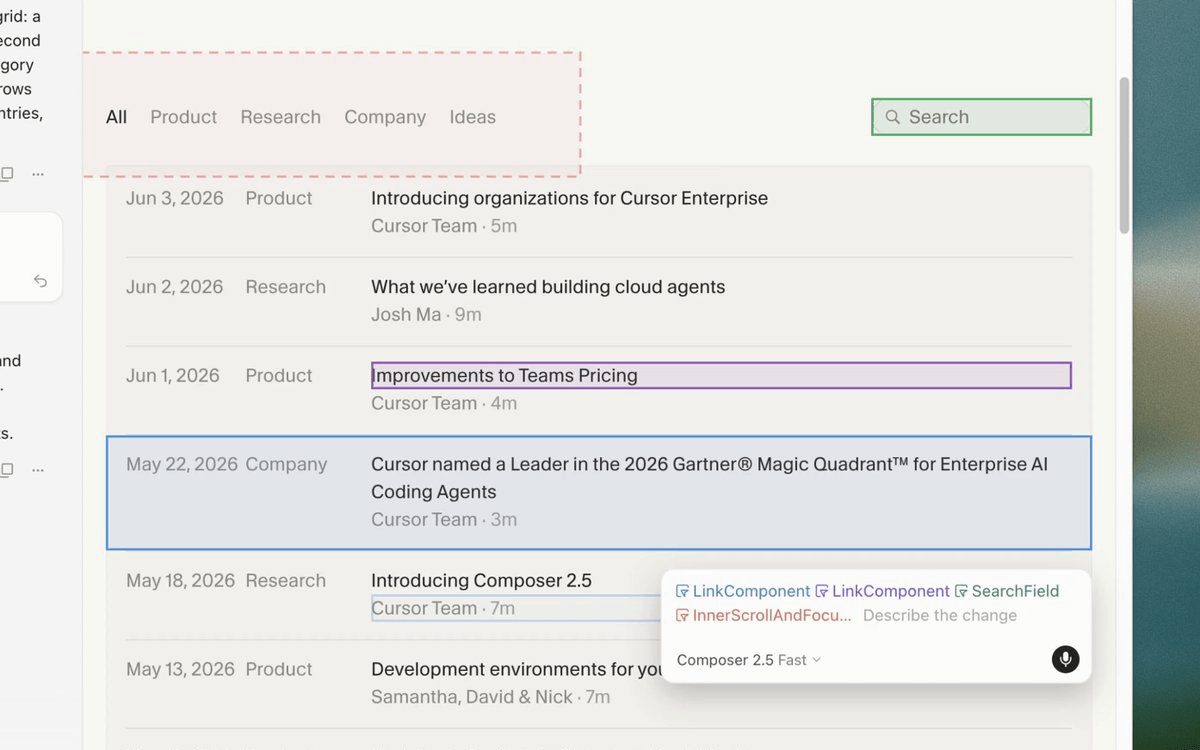
Cursor just updated Design Mode, and it fixes one of the most annoying parts of AI coding: explaining which element you mean. Before this, you'd type something like "make the third card's padding match the second one" and watch the agent confidently edit the wrong thing. Now you just point at it. Here's what you can do with it now: - Click to select: point at any element, describe the change, agent rewrites the code
- Multi-select: grab two components and ask the agent to make one match the other
- Draw on screen: circle a region, and the agent sees the exact frozen frame you were reacting to
- Voice input: narrate changes while a previous agent is still running
To use it, open the Agents Window with Cmd+Shift+P, then press Cmd+Shift+D to activate the selection layer. As agents finish, the app hot reloads and you see changes appear in the running product.
|
|
|
At Alpha Signal, our mission is to build a sharp, engaged community focused on AI, machine learning, and cutting-edge language models, helping over 200,000 developers stay informed and ahead. We're passionate about curating the best in AI, from top research and trending technical blogs to expert insights and tailored job opportunities. We keep you connected to the breakthroughs and discussions that matter, so you can stay in the loop without endless searching. We also work closely with partners who value the future of AI, including employers and advertisers who want to reach an audience as passionate about AI as we are.
Our partnerships are based on shared values of ethics, responsibility, and a commitment to building a better world through technology.Privacy is a priority at Alpha Signal. Our Privacy Policy clearly explains how we collect, store, and use your personal and non-personal information. By using our website, you accept these terms, which you can review on our website. This policy applies across all Alpha Signal pages, outlining your rights and how to contact us if you want to adjust the use of your information. We're based in the United States. By using our site, you agree to be governed by U.S. laws.
|
|
|
Looking to promote your company, product, service, or event to 250,000+ AI developers?
|
|
|
|
|
